

Download CricFy TV APK
Learn how to install CricFy TV on compatible devices, check Android requirements, review installation steps, and explore supported viewing options.
CricFy TV APK Information Table
| App Detail | Information |
| App Name | CricFy TV |
| Version | Latest |
| Developer | Not consistently verified |
| File Size | Varies by APK version |
| Android Requirement | Depends on the release |
| Category | Sports and Live TV |
| Last Updated | Depends on the source |
Download CricFy TV APK
CricFy TV is an Android application associated with live cricket and sports streaming. People search for it when they want to follow matches using their mobile devices. The available streams, channels, and viewing options depend on the specific release. Before installing the app, check its version, file size, developer information, and Android requirements. It is also important to confirm that the download source is trustworthy. Unknown APK files can contain unwanted software or request unnecessary permissions. A careful installation process helps you understand what the application needs. You should also check whether the sports content is legally available in your region. Official streaming platforms are another option for watching licensed matches.
Steps to Download and Install
- Open your Android device settings and check the Android version.
- Make sure you have enough storage space available.
- Find a trustworthy source with clear application details.
- Review the developer information and version number.
- Check the listed file size before downloading.
- Download the APK only if you trust its source.
- Scan the file using suitable security software.
- Open your Downloads folder and locate the APK.
- Review Android’s installation warning before continuing.
- Install the application if the file passes your checks.
- Open the app and review its requested permissions.
- Check the available content and confirm whether streams work.
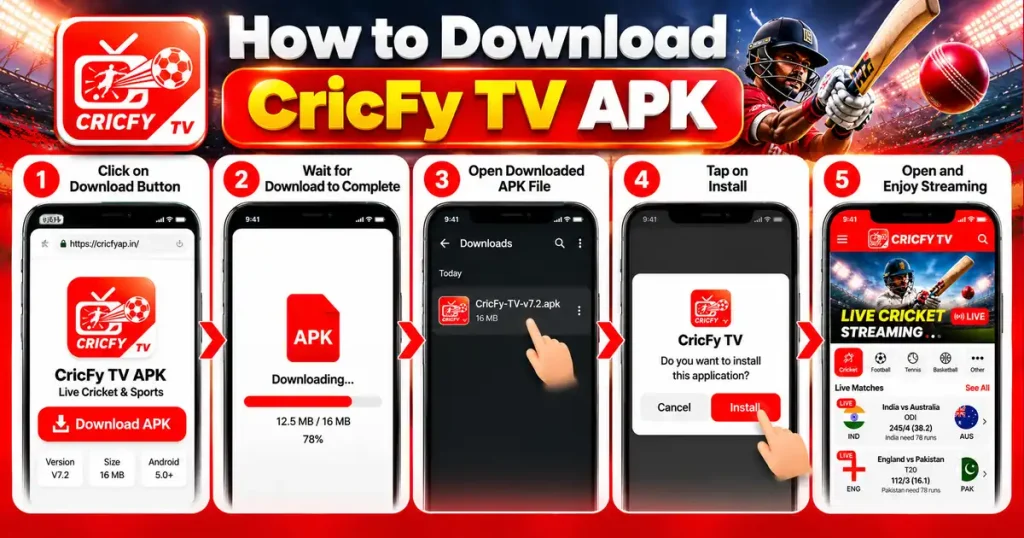
CricFy TV APK Download for Android
Android users need a compatible APK file to install the application manually. Check the Android requirements and verify the source before downloading. Once the file is downloaded, open it through your device’s file manager. Follow the installation instructions if Android allows the installation. Do not ignore security warnings or grant unnecessary permissions. If installation fails, the file may be incompatible or damaged. Consider an official streaming service if a trustworthy version is unavailable.
CricFy TV App Download for iOS
Android APK files cannot be installed directly on iPhones or iPads. iOS users should check the official App Store for a legitimate application. They can also visit the service’s official website to check supported viewing options. Avoid websites offering unknown configuration profiles or unfamiliar installation certificates. These files may introduce security or privacy risks. If no official iOS version exists, use a licensed sports streaming service available in your region.
CricFy TV Application for PC
CricFy TV may be usable on a Windows computer through a compatible Android emulator, provided the application works with that environment. First, install a reputable emulator from its official website. Check its system requirements and security information. If you have a trustworthy, compatible APK, follow the emulator’s installation instructions. Streaming performance depends on your computer, internet connection, and the application itself. Do not install unknown APK files simply because an emulator supports them.